
Incremental Data Loads vs Full Data Refresh – Which Is More Efficient at Scale?
Analytics | April 30, 2026


Understanding how data flows, which refresh strategy fits best, and how to decide the right refresh frequency maintaining speed and accuracy
Executives rely on dashboards to make informed decisions and unlock insights. But as the volume of data increases, dashboards start taking longer to load and begin to show outdated information. The issue is not always from the visual or design side and usually lies in how data is refreshed across layers in the background which includes refresh frequency and how the refresh is carried out.
Refresh decisions have a direct influence on cost, speed and accuracy. Poorly designed refresh strategies increase warehouse computation, delay report availability and weaken confidence in the reported numbers.
Perceptive Analytics POV:
At Perceptive Analytics, we have seen enterprises struggling with dashboard performance. Many times, the issue is directly linked to a faulty data refresh strategy. As datasets grow, they continue to rely on full refreshes which increases refresh windows and increases warehouse costs by 3 to 5x, while poorly governed incremental refresh quietly introduces data drift. This article aims to help you formulate the right refresh strategy for your company.
Perceptive Analytics also follows a five-second rule while creating dashboards for executive reporting. Executives must be able to view trustworthy dashboards and analyse the state of the business within seconds, without having to deal with refreshing delays or numbers that are not reliable.
Talk with our consultants today. Are slow refreshes or data drift undermining your dashboards? Perceptive Analytics can redesign your refresh architecture for scale and accuracy. Book a session with our experts now.
Live vs Extract Connection
Live connection ensures latest data, Extract connection ensures fast dashboards
A live connection queries the warehouse directly, giving the freshest view of the data at any moment. But performance reduces when queries become heavier or when multiple users use the dashboard at the same time. Extract connection creates a local snapshot of the warehouse data, enabling dashboards to load significantly faster and scale better across users. Choosing between them requires understanding whether the priority is real-time accuracy or fast user experience. Many organisations use extract connections because the performance gains outweigh the need for real-time data. A well-planned refresh schedule keeps extracts trusted and relevant.
At Perceptive Analytics, our implementation teams consist of data engineers working alongside domain experts who are aware of reporting requirements specific to their industries, such as delays in insurance claim processing, daily transactions at retail establishments, or operational timeframes within healthcare organisations. Our Tableau consulting and Power BI consulting practices configure the right connection mode and refresh cadence for each dashboard type. See our event-driven vs scheduled data pipelines guide for the architectural decision that sits at the heart of this choice.
Data Warehouses
Executive Insight: Dashboards are only as fresh as the warehouse they source from. Most enterprises rarely need data to be real-time; a right refresh strategy aligned to business rhythms is what matters to strike balance between speed and freshness. Warehouse refresh must define when data updates and how it loads. This determines how fast and how accurately dashboards can refresh later.
Dashboards can never be fresher than the warehouse behind them
Data refreshes are not only limited to the dashboards but also to the underlying repository to which the BI software connects. A typical data flow looks something like this:
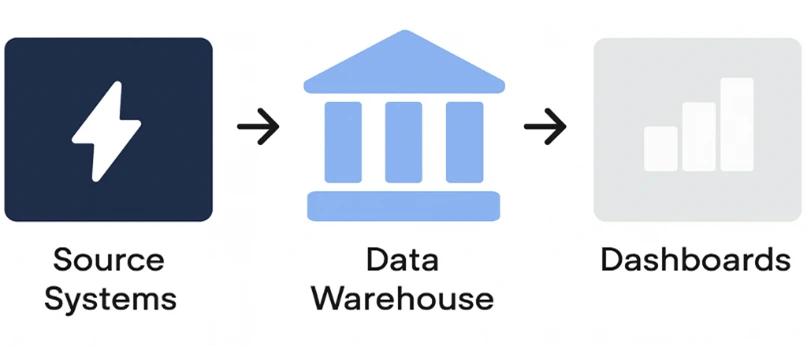
Data first lands in the warehouse before flowing into dashboards. Therefore, dashboards are only as current as the data warehouse they are connected to. Even for live connection, dashboards are not truly real-time if the data warehouse is not. Therefore, to diagnose slowness or mistrust, leaders should start upstream starting from warehouse and then move to the BI layer. Our data observability as foundational infrastructure practice monitors this entire chain, from warehouse ingestion through to dashboard render time.
Think of refresh strategy as a chain: warehouse to refresh method to dashboard experience.
Data doesn’t need to be real-time; it needs to be right-time
Most businesses do not require their data to be updated continuously. Typically, the data will update at regular intervals, such as hourly, nightly, or several times throughout the day. The appropriate refresh intervals depend on the usage of the reports, as well as the pace at which the source data changes. Too frequent a refresh can waste money in computational power, while insufficient refresh leads to outdated reports. This is where the decision between full refresh and incremental refresh begins. Our Snowflake consulting and Talend consulting teams design the warehouse-level refresh architecture that sets the correct cadence at the source.
Full Refresh vs Incremental Refresh
Executive Insight: Full refresh ensures accuracy by rebuilding everything end-to-end, while incremental refresh improves efficiency by loading only the changed portion of data. Incremental scaling demands the right change-tracking key, or accuracy suffers silently. The most reliable pattern combines incremental daily with periodic full refreshes, balancing speed and correctness.
Full refresh rebuilds the entire dataset, ensuring accuracy when past data changes
In this approach, the entire dataset must be reloaded from scratch. It is an extremely effective approach for catching all data changes because there are no chances of anything slipping through the cracks. In finance and compliance departments, the use of this strategy is encouraged because it makes no room for any backdated adjustments to be left behind. However, the main issue here is scalability.
Incremental refresh loads only new or changed data, reducing refresh time with growing data
When compared to full refreshes, incremental refreshes only include records which were added after the previous run was completed. Incremental refreshes are particularly useful in cases of logs or transaction records when most of the time new data is only appended to the previous one. However, it requires the ability of your system to detect changes in order to work.
The incremental key is not a technical detail, it is the accuracy pivot
Selecting a good reference key for incremental refreshes is where most enterprise-scale analytics solutions fail. When selecting a key, you need to remember that it may fail to detect any updates made to records which existed before the current date. For example, by choosing “order date” as the key, you risk not detecting any updates in the shipping status of existing orders. Our automated data quality monitoring practice builds the validation layer that catches key-related drift before it compounds into reporting errors.
The most scalable setup is hybrid: incremental daily, full refresh periodically to reset drift
Incremental handles everyday loads efficiently, while scheduled full refreshes catch missed updates and schema evolution. This combination prevents silent data divergence and maintains long-term trust in reports.
Hybrid = speed today, correctness over time.
We usually advise companies to develop refresh architecture that is future-proof and scalable, so that they can accommodate new geographies, acquisitions, sources, or reporting needs without having to re-engineer their whole analytics system. Scalability is a key aspect of the work we do at Perceptive Analytics. See our data transformation maturity framework for the governance model we apply to keep refresh architecture sustainable over time.
Dashboards
Executive Insight: Dashboards should refresh only after the warehouse completes; otherwise, stale or partial data appears fresh. Incremental refresh fits large datasets (1M+ rows), while small datasets often refresh faster with full reloads. Rolling windows and materialized views help keep dashboards lean as history grows.
Dashboard refresh must always run after the warehouse refresh, never in parallel or before
If the dashboard refresh starts while the warehouse is still updating, it can pick up partially loaded tables. If it is triggered ahead of warehouse completion, users see stale data that appears current. This sequencing issue largely remains unnoticed until the dashboards are widely adopted. This problem worsens when organisations start to rely on periodic refresh as a single mistimed run can ruin the entire data pipeline. Our static pipelines are becoming an enterprise liability article explains why manual sequencing is a structural risk at scale.
In addition, a good governance approach to refreshing data also means less time spent by analysts. At Perceptive Analytics, we support organisations in saving time for their analysts by providing automation capabilities in terms of checks, dependencies, and alerts.
Incremental refresh becomes essential when datasets are large (1M+ rows and beyond)
For datasets exceeding 1M rows always go for incremental refresh. When datasets are small, go for full refresh as the difference in processing time between full and incremental refresh is minimal.
Full refresh is the right choice when schema or business logic changes
New fields, changed formulas, or updated grain definitions demand a clean rebuild. Incremental refresh can miss these structural changes and retain outdated logic without warning. Full refresh ensures alignment whenever the meaning of data shifts.
Rolling-window refresh keeps data current while preventing historical bloat
In incremental refresh, data volumes can quickly explode as new data consistently appends to the older one leading to slower reports. Software like Power BI has a rolling window mechanism to solve this issue. If the dashboard is set for daily refresh, then define a rolling window like last two years for historical data and last day for new data. This will prune data greater than 2 years while updating records from the previous day.
Pro Tip: Use materialized views in the warehouse to further simplify the refresh process. A materialized view is a pre-built table that automatically updates and holds the latest slice of data. The BI software can directly connect to this table instead of the original one automatically limiting the size of the dataset to a set time period.
Conclusion
When datasets grow, the right refresh strategy becomes pivotal. For data warehouses, in most cases, the most efficient approach is to use incremental refresh supported by periodic full refreshes to maintain data integrity. For dashboards, go for full refreshes when the dataset is connected to a materialised view or when the dataset used is small. If the historical dataset required for reports is large along with new data that needs to be appended, it is better to go with incremental refresh.
In most organisations, refresh techniques rarely fail on the first day; but gradually over time as data volumes, users and reliance on analytics increases.
If your dashboards are struggling with scale, let’s talk. At Perceptive Analytics, we work with organisations to strengthen their entire dashboard setup ensuring their data flows efficiently, updates reliably, and supplements decision making. Our Power BI implementation services, Tableau implementation services, and advanced analytics consulting practice deliver the end-to-end refresh architecture that makes dashboards reliably fast.
Talk with our consultants today. Ready to build a refresh strategy that keeps dashboards fast, accurate, and trusted at scale? Book a session with our experts now.