
What are the Caching and Aggregation Strategies to Keep Tableau Dashboard Performance at Scale?
Tableau | April 30, 2026


A practical guide to accelerating BI dashboards through smarter caching, summarisation, and model design
As enterprises increasingly adopt cloud data platforms, they rely on dashboards for real-time executive and operational decisions. At the same time, user concurrency, data volumes and refresh frequency continue to grow which makes performance a critical bottleneck in widescale adoption.
Think of dashboard speed as a chain: data model to query load to cache reuse to user experience. Weakness at any one layer slows everything downstream.
Perceptive Analytics POV
At Perceptive Analytics, we see BI performance shift from being a tooling problem to more of an architectural problem. Our approach focuses on intelligent caching and eliminating unnecessary query-time work, resulting in load times improving by over 4x in some scenarios. The strategies below reflect some of the techniques we apply in Tableau to maintain dashboard performance over big data.
Perceptive Analytics also follows the five-second rule when building dashboards for executives. The leader must be able to access a vital Tableau dashboard and comprehend the business’s main priorities without waiting due to inefficient processes on the backend side.
The true question for executives is not “Is Tableau slow?” It is “Where is the inefficiency at scale?”
Talk with our consultants today. Is your Tableau environment slowing down under scale? Perceptive Analytics can diagnose and fix the architectural bottleneck. Book a session with our experts now.
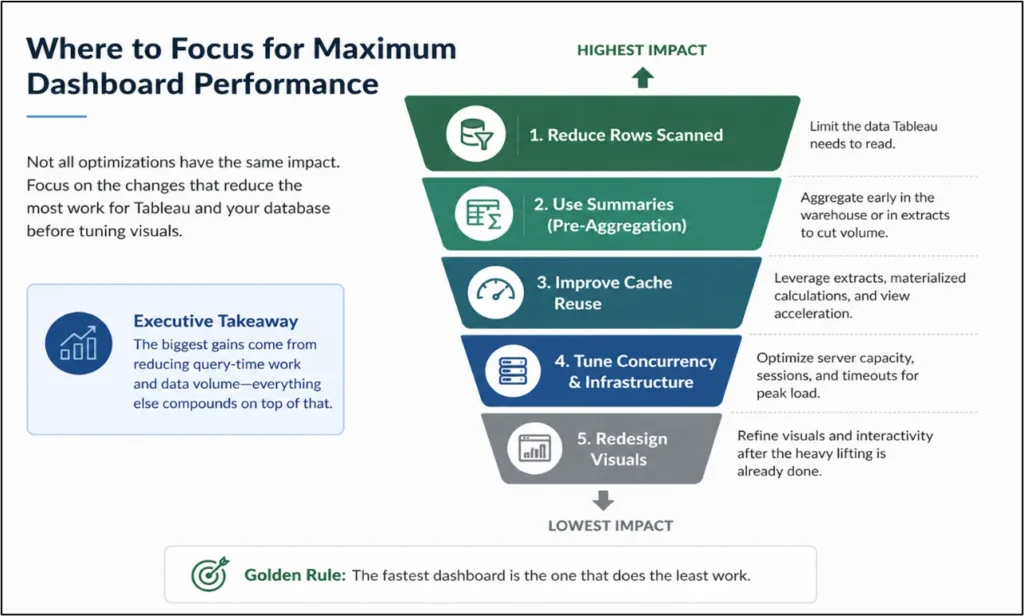
Caching Strategies
Whenever the same question is asked several times, performance should rely on memory rather than on computation.
Executive Insight: Tableau’s caching strategies rely on software-related settings like materialising calculations inside extracts, pre-running heavy queries through View Acceleration, warming caches via scheduled subscriptions and refreshing only new or updated data.
Materialising calculations avoids re-calculations by storing them in the extract
After creating calculated fields or LOD expressions, go to Materialize calculations in extract. This will direct Tableau to work out these calculations once during the extract build, then stores them as ready-made values instead of recomputing them each time the dashboard is opened.
In addition, our team at Perceptive Analytics blends Tableau engineering know-how with industry experts who are familiar with the way metrics work within various sectors, including insurance, retail, healthcare, and manufacturing, to ensure that optimisations are made without impacting business logic or reporting accuracy. See our Tableau optimisation checklist and guide for the full diagnostic framework we apply.
Enable View Acceleration to pre-run heavy queries so dashboards open faster
Tableau executes the expensive query work in the background and stores the results, eliminating load-time computation. When users open the dashboard, Tableau simply renders the view using precomputed data, dramatically reducing wait times for complex or high-traffic reports. Turn on View Acceleration for selected workbooks or views from the Tableau Server/Cloud interface.
Cache warming ensures dashboards open instantly by pre-running critical views
Dashboards can be pre-loaded before important meetings, so executives never face delays. Tableau automatically “runs” the dashboards in advance and stores the results, making them open instantly during use. On Tableau Server or Tableau Cloud, schedule a subscription email after extract refresh for key dashboards at set times (e.g., an hour before the weekly executive meeting). Our frameworks and KPIs that make executive Tableau dashboards actionable article covers how we design these pre-warmed executive views.
Incremental refresh speeds up dataset updates by processing only new or changed data
When connecting large datasets through extract connection in Tableau, choose incremental refresh for datasets that keep adding rows to already existing data. This will make the refresh process significantly faster than full refresh. Ensure that the refresh is set at off-peak hours to avoid system slowdown while they are in use. For more information about full refresh vs incremental refresh, refer to our article here.
Pro Tip: Use materialized views in the warehouse to further simplify the refresh process. A materialized view is a pre-built table that automatically updates and holds the latest slice of data.
Aggregation Strategies
The fastest query is often the one that never touches raw transaction data.
Executive Insight: Aggregation Strategies for Tableau focus on connecting summarised data to the software, filtering data and storing it in aggregated form during extract building and avoiding row duplication in extracts by using multi-table extract storage.
Storing aggregated and filtered data keeps extracts lightweight and dashboards fast
Instead of bringing in every row of data, Tableau can store only the most relevant slice (e.g., last 2 years of sales). It can also aggregate the data while storing it (enable Aggregate data for visible dimensions), only keeping summaries like monthly totals, rather than every transaction. Also, apply filters on this extract to limit unnecessary rows or columns. This makes dashboards lighter and faster to use. Our how to optimise Tableau performance at scale with proven results case study documents the real-world outcomes of applying this pattern.
Use multi-table extract storage when joins artificially inflate row counts
In case your joins result in duplicate entries, making extracts too bulky, Tableau multi-table storage is what you should adopt. In essence, the process involves storing all the tables independently rather than cramming them in one big table. By doing so, row explosion is avoided, and the scanning of data becomes less for Tableau when generating reports.
Warehouse-level summaries cut data volume before it even reaches Tableau
Most strategic dashboards do not require viewing all transactions to be valuable. This allows you to create pre-aggregated tables within your data warehouse, such as monthly revenues or customer groupings. With Tableau being connected to those aggregated tables, you will reduce the amount of rows processed by Tableau, thereby increasing speed in your dashboards. Our Snowflake consulting team designs these warehouse-level aggregation layers as a standard component of scalable Tableau deployments. See also our modern BI integration on AWS with Snowflake and Power BI framework for how this fits into the broader architecture.
In most cases, we at Perceptive Analytics prefer to provide our clients with future-oriented data modelling because this approach helps our clients introduce any new KPIs or business units without having to change their whole Tableau environment from scratch.
Server-Side Performance Strategies
If the dashboards are only slow during peak periods, then concurrency becomes the bottleneck rather than dashboard design.
Executive Insight: Server-side strategies focus on preserving sessions, controlling live query load, extending cache duration for live connections, and sharing extracts across workbooks.
Tuning Session Timeouts to Preserve Cache and Avoid Cold Starts
Tableau cache often resets when VizQL sessions unload or extract refreshes overlap with user activity. Improve cache survivability by tuning session persistence via vizqlserver.session.expiry.timeout and reducing session teardown with vizqlserver.clear_sessions_on_unload.
Control Live Query Load Through Topology and Timeout Policies
Live queries can saturate VizQL and databases under concurrency. Adjust VizQL capacity through tsm topology and applying timeout rules like backgrounder.querylimit to prevent long-running queries from consuming compute during peak hours. This keeps interactive dashboards responsive even when heavy workloads run in parallel. Our Tableau developer and Tableau expert teams configure these server topology settings as part of every enterprise Tableau deployment.
Extend Live Query Cache Duration to Reduce Database Trips
While many organisations pay close attention to extract schedules, they tend to overlook live query cache management. Through the use of tsm data-access caching set, you will be able to instruct Tableau Server to reuse previously executed queries for a longer duration. For executive dashboards where data freshness tolerance is high (e.g., hourly/daily metrics), extending cache reuse reduces backend pressure and increases cache hit probability.
Cache Boost by Publishing Extracts as Separate Shared Data Sources
Publishing extracts as shared data sources allows Tableau Server to reuse query results across multiple dashboards, instead of each workbook maintaining its own cache. This turns caching into a shared asset, reducing refresh frequency, lowering Hyper processing demand, and significantly increasing cache hit rate for high-traffic dashboards. Our Tableau implementation services team implements this shared source architecture as a governance standard. See our choosing a trusted Tableau partner for data governance guide for the broader governance framework.
Speed at Scale Comes from Shifting Work Away from the Dashboard
It is crucial to reduce manual processes associated with dashboard management. To speed up calculations, cache the data so it would not be computed twice. Minimise the size of your data sets through proper aggregation. In this way, you will have increased the efficiency of operations twice.
The professionals from Perceptive Analytics will analyse the dashboard infrastructure and provide you with recommendations for optimisation. The suggestions will fully match the uniqueness of your working style. Our Tableau development services and Tableau consulting practice deliver these performance improvements as structured engagements, not one-off fixes.
When configuring your Tableau effectively, it becomes easier to access the necessary information. This will come down to choosing metrics and setting appropriate filters. By improving the quality of your data sets, executives will be able to extract useful information independently of a data analyst.
Talk with our consultants today. Ready to build a Tableau environment that stays fast as your data scales? Book a session with our experts now.